6 Best Business Card Maker Tools for Small Businesses

Riten Debnath
08 Mar, 2026
Networking hasn't died; it just got a lot more competitive. You can send all the LinkedIn requests you want, but there is still something incredibly powerful about handing over a physical piece of your brand that someone can actually feel and keep. A great business card acts as a silent salesperson that sits on a desk long after you have left the room. However, for a small business, you don't want to spend a month's rent on a graphic designer just to get your phone number on a piece of cardstock. You need a tool that is fast, professional, and won't make you want to pull your hair out.
I’m Riten, founder of Fueler, a skills-first portfolio platform that connects talented individuals with companies through assignments, portfolios, and projects, not just resumes/CVs. Think Dribbble/Behance for work samples + AngelList for hiring infrastructure.
1. Design.com
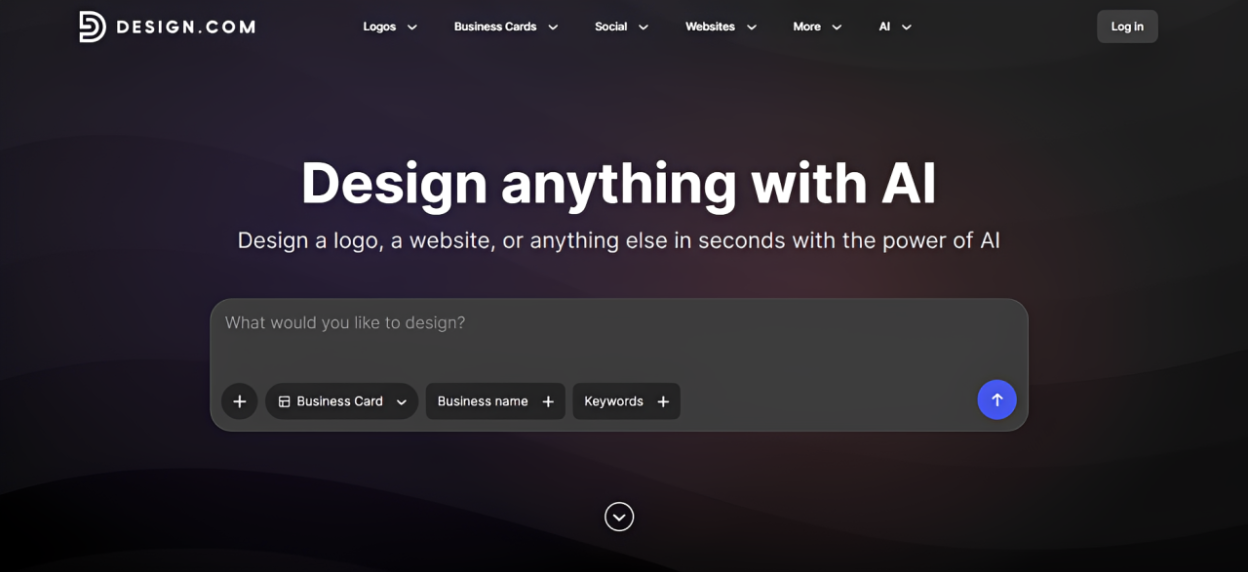
Design.com is your best bet if you want your business card to actually feel like your brand, rather than just your logo slapped on a generic template. Their business card maker can generate designs that are aligned with your business name, keyword, and industry ensuring you get 100% tailored and relevant designs rather than a generic template that feels “close enough”.
Here’s what they gave for a chic NYC design studio:
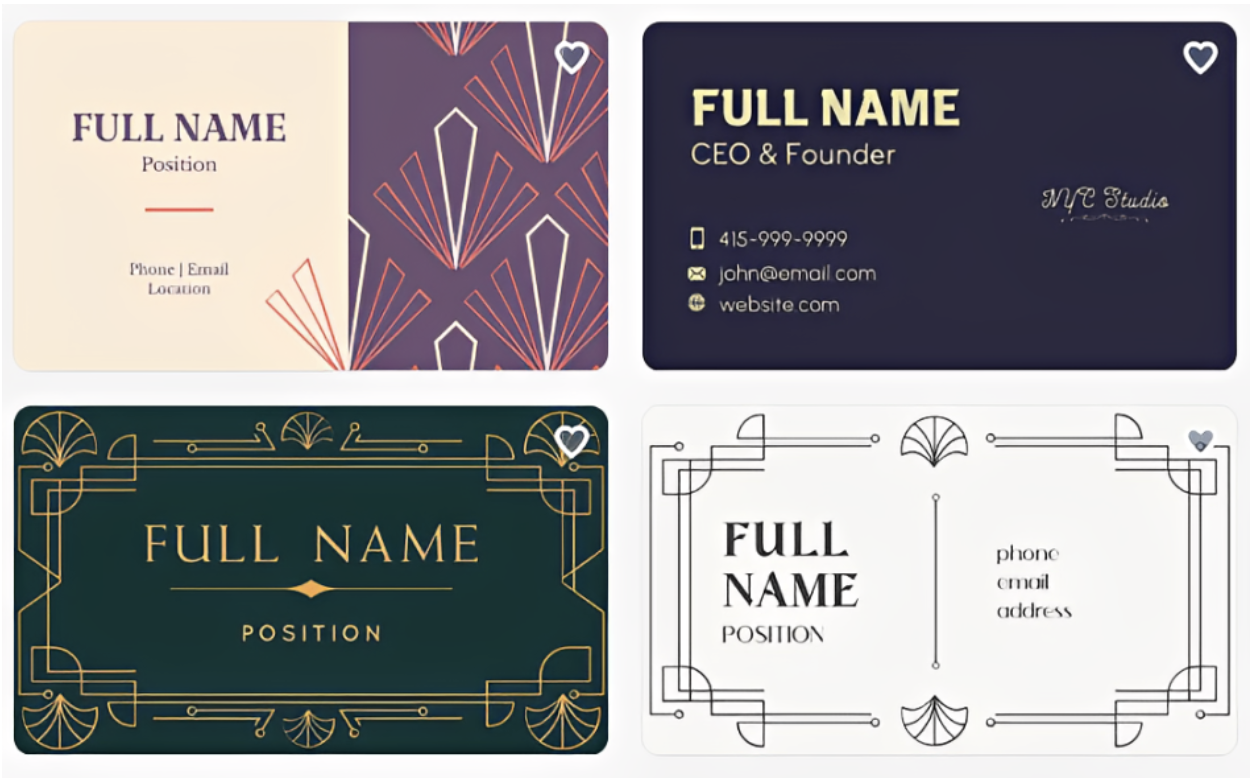
- On-Brand Designs: Design.com’s AI looks at your business name, industry, keywords, and other brand context to generate cards that fit what your company actually does. Whether you run a seafood grill or a landscaping company, you can get designs that visually make sense for that type of business instead of endlessly scrolling through generic corporate templates. This gives small businesses a much stronger starting point and cuts down the amount of editing needed before a card feels like your own.
- Huge Business Card Template Library: There are over 10,000 business card templates to explore, covering everything from common industries to much more specific business niches. This is especially useful for owners who know what they want but do not have the design skills to build it themselves. You can just search for what you need and simply add your business details.
- Beginner-Friendly Editor: The editor is a straightforward drag-and-drop, so changing text, colors, fonts, shapes, and layouts does not require any technical experience. You also get access to a huge library of fonts and graphics, giving you enough flexibility to personalize a template without turning it into a full-on Photoshop session.
- Direct Printing: If you don’t want to deal with finding a separate printer, Design.com also lets you order your business cards directly through the platform. This makes the whole process much more convenient for busy small business owners.
- Full Branding Toolkit Beyond the Card: Design.com also has tools for logos, social media graphics, email signatures, letterheads, websites, and other marketing materials. Once you establish your branding, you can carry the same visual identity into the rest of your business instead of rebuilding everything from scratch. It is a simple way for a one-person operation or small team to look like they have an entire design department behind them.
Pricing:
- Free: Free business card designs are available for download.
- Premium: Paid options unlock premium designs and additional branding features.
2. Adobe Express
Adobe Express is the younger, faster brother of Photoshop. It is designed for people who want a slightly more "editorial" or high-end look than what you find in standard template libraries. It gives you access to the world-class Adobe Fonts collection, which is often the secret ingredient that makes a business card look expensive. If you want your card to look like it belongs in a high-fashion magazine or a sleek tech office, this is your tool.
- Adobe Fonts Library Access: You have access to thousands of licensed, high-end fonts that give your text a level of sophistication that generic free tools simply cannot match or reproduce in their basic libraries. This allows you to choose typography that carries the right emotional weight for your brand, whether you want to appear as a traditional, reliable consultant or a cutting-edge creative agency.
- High-End Design Assets: The library includes professional-grade textures, icons, and illustrations that help you add depth to your card, making it feel like a custom-commissioned piece of art rather than a template. These assets are curated by design experts, ensuring that even a simple card can have a unique "premium" feel that makes people hesitate before throwing it away or losing it in a stack.
- One-Click Background Removal: If you want to put your headshot on your business card, the background remover creates a clean, professional cutout without the jagged edges common in cheaper, less sophisticated design software. This is particularly useful for realtors, speakers, or freelancers whose face is a core part of their brand, as it ensures the image integrates perfectly with the rest of the card’s design.
- Creative Cloud Integration: If you ever hire a professional designer later, they can easily take your Adobe Express files into "big" Photoshop or Illustrator to give them a final, corporate-level polish or expansion. This makes your brand "future-proof," allowing your visual identity to evolve and grow alongside your business without having to start from zero every time you upgrade your marketing materials or professional needs.
- Professional Quick Actions: You can instantly convert your card designs to high-quality PDFs or SVGs, which are the specific file types that professional local print shops require for the best possible results. This ensures that the colors you see on your screen are the ones that actually appear on the paper, preventing the dull or shifted colors that often ruin DIY business card projects.
Pricing:
- Free Plan: $0 (Includes basic templates and a limited number of Adobe Fonts).
- Premium Plan: $9.99 per month (Unlocks the full font library and advanced branding tools).
3. Vistaprint
Vistaprint has moved beyond just being a printer; its online design tool is now a fully-fledged maker that is incredibly robust for small businesses. They are the kings of physical variety. If you want a card made of wood, plastic, or even metal, Vistaprint is the place to be. Their tool is built specifically around the physical end-product, so you always know exactly how your design will translate to the actual material you've chosen.
- Massive Physical Material Selection: You can choose from standard paper to premium stocks like linen, pearl, or even 2026’s trending metal-industrial finishes that make your brand feel indestructible and high-tech. Having this level of tactile variety allows you to appeal to the "touch" sense of your clients, creating a memorable physical experience that a standard, flimsy paper card simply cannot provide to a prospect.
- Real-Time 3D Preview: The design tool offers a 3D mockup of your card, allowing you to tilt and turn it to see how light catches special finishes like gold foil or embossed text. This prevents the "surprise" of receiving cards that don't look how you imagined, giving you the confidence to invest in more expensive premium finishes like raised gloss or holographic elements for a truly standout look.
- Industry-Specific Guided Templates: Their tool categories are designed by specific nichelike construction, healthcare, or law, ensuring that the imagery and layout are already culturally appropriate for your specific field of work. This saves you from the "identity crisis" of picking a design that looks great but doesn't actually communicate what your business does to someone who is quickly glancing at your card during a busy event.
- Direct-to-Print Correction: Vistaprint’s system automatically checks your design for common errors like "safety margins" or low-resolution images before you pay, acting as a final filter against costly mistakes. This automated proofing is a lifesaver for busy founders who might overlook a small typo or a cropped-off logo in their rush to get marketing materials ready for an upcoming conference or meeting.
- Matching Marketing Suites: Once your card is finished, the tool can automatically apply that same design to flyers, banners, and even custom pens, helping you build a cohesive "brand kit" in minutes. This allows a small business to look much larger than it is, creating a professional and "organized" image that builds trust with potential clients who see your branding across multiple different physical items.
Pricing:
- Design Tool: Free to use.
- Printing: Starts around $15 for 50 standard cards; prices scale significantly based on "Premium" or "Luxury" finishes and materials.
4. Moo
If Canva is the standard and Vistaprint is the variety, Moo is the luxury. Moo is famous for its "Luxe" cards, which are triple-thick and feature a streak of color through the middle. Their design tool is incredibly clean and focuses on "Printfinity," a feature that lets you print a different design on every single card in a pack. It’s perfect for photographers or designers who want to use their business cards as a mini-portfolio.
- Printfinity Technology: This unique feature allows you to upload a different image or project sample for every card in a single pack, essentially turning your business cards into a deck of work. This is the ultimate conversation starter at networking events, as you can ask a prospect to "pick their favorite design," which instantly creates an engaging and memorable interaction between you and them.
- Triple-Thick Luxe Paper: Their Luxe cards are made from four layers of Mohawk Superfine paper, resulting in a card so thick it’s nearly impossible to bend and feels like a piece of jewelry. This level of physical quality communicates that your business doesn't cut corners, positioning you as a premium service provider who values high-end craftsmanship and pays attention to the smallest details of their work.
- Designer-First Layouts: Moo’s templates are noticeably more "modern" and "chic" than other platforms, leaning heavily into minimalist aesthetics that appeal to the creative and tech industries. These layouts are designed to let your logo and contact information breathe, creating a sophisticated look that feels "designed" rather than "assembled," which is crucial for businesses that sell high-ticket creative or consulting services.
- Tactile Special Finishes: You can add raised spot gloss, gold foil, or silver foil that has a distinct "texture" you can feel with your thumb when holding the card. These tactile elements make your card "sticky" in the mind of the receiver, as the brain processes the physical sensation alongside your brand name, making it significantly more likely that they will remember your encounter later.
- Eco-Friendly "Cotton" Stock: Moo offers cards made from 100% recycled t-shirt offcuts, providing a beautiful, uncoated texture that is both sustainable and incredibly premium to the touch. This allows your small business to wear its values on its sleeve, appealing to eco-conscious clients who appreciate companies that take extra steps to reduce their environmental footprint without sacrificing design quality.
Pricing:
- Design Tool: Free to use.
- Printing: Starts around $20.00 - $22.00 for 50 cards; premium stocks like Luxe can cost $40+ for the same quantity.
5. Zazzle
Zazzle is a bit different because it isn't just a design tool; it's a marketplace of independent designers. You can find "templates" that are actually unique pieces of art created by real people. The "Zazzle Create" tool is surprisingly powerful, allowing you to take a designer’s vision and tweak it until it perfectly fits your small business. It is the best option if you want a card that looks "hand-drawn" or "hand-crafted."
- Independent Artist Templates: You aren't just using generic corporate templates; you are using layouts designed by real artists who upload their work to the platform for you to use. This gives your business card a "soul" and a unique artistic flair that is often missing from the more rigid, corporate-focused design tools found on other major printing websites or generic marketing platforms.
- Niche Industry Focus: Because the templates are created by individuals, you can find cards for very specific niches like "organic soap makers," "vintage watch dealers," or "yoga instructors" that feel authentic. These designers understand the specific visual "cues" of their industries, helping you communicate your brand's personality through art styles that resonate deeply with your target audience's specific tastes and preferences.
- Live "Designer Help" Feature: Zazzle often offers a service where you can pay a small fee to have a professional designer look over your work and make final tweaks to ensure it’s perfect. This provides a "safety net" for small business owners who are nervous about their design skills, giving them access to professional feedback without the high cost of hiring an agency for a full project.
- Flexible Shape and Size Options: Beyond the standard rectangle, you can choose square, mini, or "mighty" oversized cards that demand attention the moment they are pulled out of a pocket. Playing with the physical dimensions of your card is a simple way to stand out in a stack of traditional cards, ensuring that your business is literally "larger than life" in the eyes of a prospect.
- High-Volume Discounts: Zazzle is excellent for small businesses that are scaling fast, as their pricing drops significantly when you order in larger quantities for a full team. This makes it an affordable long-term partner as your business grows, allowing you to maintain a high-end artistic look while benefiting from the economies of scale that come with a large printing house.
Pricing:
- Design Tool: Free to use.
- Printing: Generally starts around $20 - $25 for 100 cards; frequent sales often bring the price down by 20% to 50%.
6. PsPrint
PsPrint is the tool for the business owner who knows exactly what they want and wants a no-nonsense, high-quality result. Their design tool is straightforward, but their real strength is in the technical options they provide, such as "die-cutting." If you want your card to be in the shape of a house, a circle, or a custom logo, PsPrint can handle the technical complexity that would confuse other "simpler" online tools.
- Custom Die-Cutting Expertise: They allow you to create cards in custom shapes, which is one of the most effective ways to make a physical brand "unforgettable" in a crowded market. Whether it's a card shaped like a camera for a photographer or a bone for a pet groomer, these custom shapes act as a permanent visual metaphor for what your business actually does for its clients.
- Ultra-Thick Stock Options: PsPrint offers some of the thickest paper stocks in the industry, including "triple-thick" cards that feel more like a small wooden plank than a piece of paper. This heavyweight stock conveys a sense of "gravity" and "permanence," subtly telling the person holding it that your business is stable, successful, and here to stay for the long haul in your competitive industry.
- Free File Review Service: Unlike many automated tools, PsPrint offers a real human review of your files to check for technical issues like resolution, bleed, and color accuracy before they go to print. This "human touch" provides an extra layer of security that ensures your final cards look exactly like the professional vision you had in your head, preventing expensive reprints and wasted time.
- Eco-Friendly Recycled Options: They have a strong selection of 100% recycled paper stocks that don't look "cheap" or "gray," maintaining a bright white finish while remaining environmentally responsible. This is a great way for small businesses to align their physical marketing with their corporate social responsibility goals, showing clients that you care about the planet as much as you care about your professional image.
- Custom Foil Stamping: Beyond just "gold" or "silver," PsPrint offers a wide range of colored foils that can be stamped onto your card to create a brilliant, reflective effect that catches the eye. Foil stamping adds a literal "shine" to your brand, making key elements like your logo or your name pop off the card with a level of luxury that traditional ink-on-paper printing cannot achieve.
Pricing:
- Design Tool: Free to use.
- Printing: Starts around $30 - $35 for 500 standard cards (making it very cost-effective for high volume); custom die-cuts and foils add significant setup costs.
Showcase Your Brand on Fueler
Once you have designed your business cards and started networking, you need a place to send all those new contacts. This is where Fueler comes in. A business card is just the "invitation," but your Fueler portfolio is the "main event." A business card maker takes care of creating that invitation, while your portfolio gives potential customers a reason to keep exploring after they scan the card. Instead of just listing your phone number, your business card can lead people to a beautiful, skills-first portfolio that shows off your actual projects and proof of work. It’s the best way to prove that you are as professional as your card makes you look.
Final Thoughts
A business card is often the only physical thing a potential client takes home from a meeting. Whether you choose the artistic flair of Zazzle, the luxury of Moo, or the efficiency of Canva, the goal is to create something that feels like an extension of your hard work. Don't just settle for the "default" look; take an extra ten minutes to pick a material or a font that actually says something about who you are as a business owner.
FAQs
1. Is it better to design my own card or hire a professional?
For most small businesses, using a tool like Canva or Adobe Express is more than enough to create a professional look at a fraction of the cost. These tools use templates designed by pros, so you are essentially getting a professional layout that you just have to customize. However, if your brand needs a completely unique "hand-drawn" identity, that is when you might consider hiring a dedicated graphic designer for a custom project.
2. What are the most important things to put on a business card?
In 2026, less is more. You need your name, your job title, your company logo, and one primary way to contact you (usually an email or a phone number). Crucially, you should also include a QR code or a link to your Fueler portfolio or website so people can see "proof" of your work immediately. Avoid cluttering the card with every social media handle you own; just stick to the essentials that drive people to your best work.
3. What is the standard size for a business card?
The standard size is 3.5 inches by 2 inches. However, many people are now moving toward "Square" cards (2.5" x 2.5") or "Mini" cards to stand out. While unique shapes are great, remember that most wallets and cardholders are designed for the standard 3.5" x 2" size, so if you go too far outside those dimensions, your card might end up in the trash because it doesn't fit anywhere convenient for the receiver.
4. What is "Bleed" in business card design?
"Bleed" is the extra space around the edge of your design that gets trimmed off after printing. When you are using a maker tool, you should always extend your background colors or images all the way to the "bleed line." This ensures that if the cutting machine is off by even a fraction of a millimeter, you won't end up with an ugly white sliver of paper along the edge of your perfectly designed professional business card.
5. Should I get a matte or gloss finish?
Matte finishes are generally considered more "modern" and "sophisticated," and they are much easier to write on if you want to jot down a quick note for a client. Gloss finishes are great if your card has a lot of high-contrast photos or vibrant colors, as the shine makes images "pop." For most professional services like law, consulting, or tech, a matte or "soft-touch" finish is the safer and more contemporary choice for a small business.
What is Fueler Portfolio?
Fueler is a career portfolio platform that helps companies find the best talent for their organization based on their proof of work. You can create your portfolio on Fueler. Thousands of freelancers around the world use Fueler to create their professional-looking portfolios and become financially independent. Discover inspiration for your portfolio
Sign up for free on Fueler or get in touch to learn more.

What should you do next?
You've read the article. Now turn your skills into proof of work and unlock more opportunities.
Build your proof of work portfolio
Create a clean portfolio with projects, assignments, resumes, and AI stack details that companies actually want to see.
Create your Fueler portfolio →Apply through assignments, not resumes
Stand out by solving real tasks from companies hiring on Fueler.
Explore assignments →Get discovered by companies
Make your work public and let recruiters discover your skills through actual projects instead of keywords.
Get discovered →
