
Music Player UI


Music Player UI
🌐 Website: musicspace-ui
🎁 Project Overview
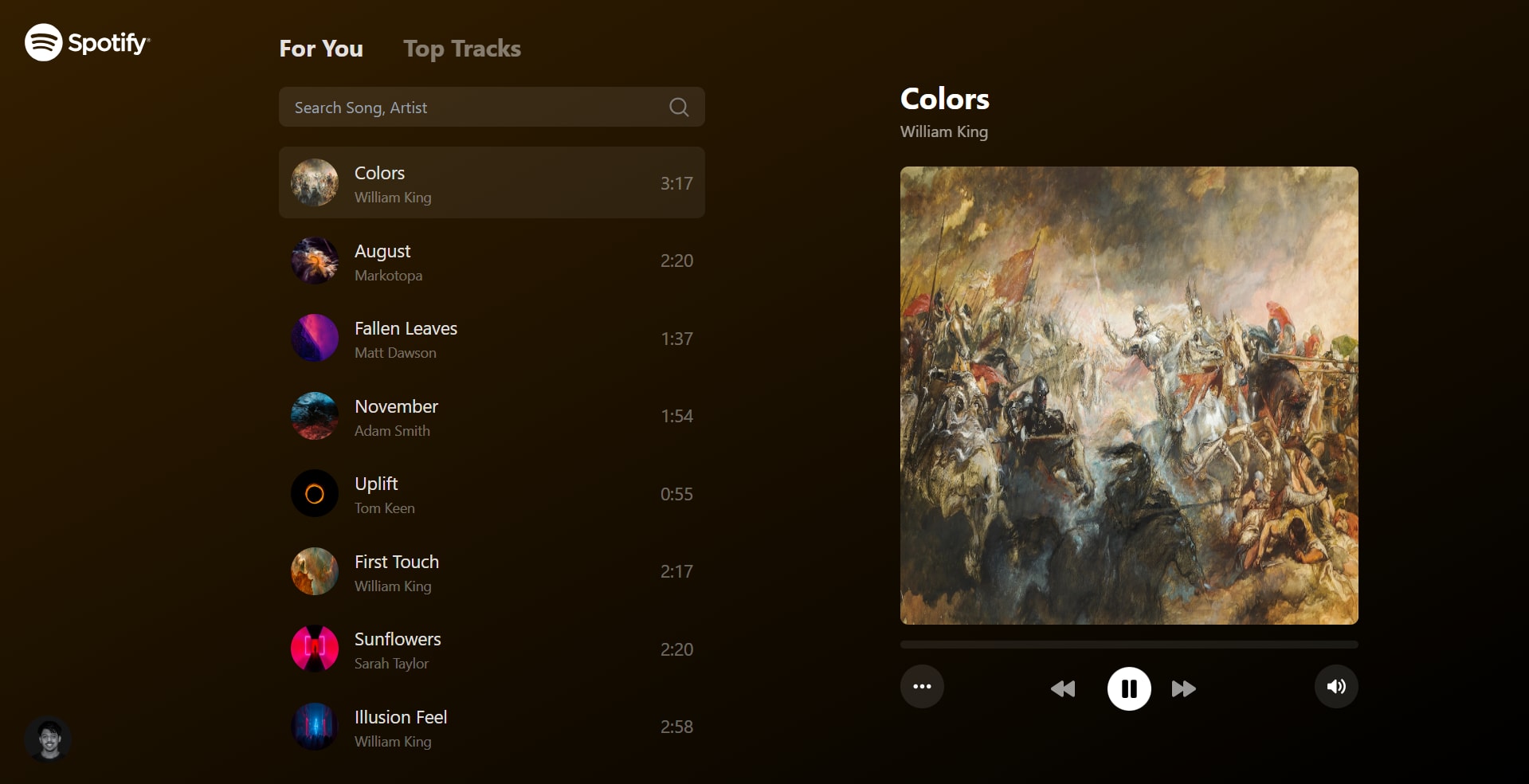
The Music Player UI is a web application that allows users to browse, search, and play music tracks. It features a responsive design, real-time background color changes, and seamless playback across different browser tabs.
😍 UI Components
Initial loading & error fallback UI


Main component with different tabs


Responsive screen(mobile view) UI with a sidebar to list all songs


⚡ Project Specifications
🕹️ Technical Requirements
- Framework: React JS
- API Integration: Use REST API to load list data
- Responsive Design: Adapt layout for smaller screens
- Cross-tab Functionality: Music continues playing when user switches tabs
- Dynamic Styling: Background gradient color changes based on the current song's cover image
- Animations: Implement fluid transitions and animations (e.g., list loading, background color change)
✅ Functionality
The Music Player UI includes the following features:
- [✔️] Search: Allow users to search for songs and artists
- [✔️] Music Control:
- Play/Pause
- Next Track
- Previous Track
- Mute/Unmute
- [✔️] Tab Navigation: Allow switching between For You and Top Tracks sections
- [✔️] Playback Control: Implement a seeker to control music playback position
🥤 Responsive Design
- For smaller screens, the player component should be the main interface
- Implement a menu button to show the list of songs on mobile devices in a sidebar.
🪄 User Interface
- Song List: Display a scrollable list of songs with cover art, title, artist, and duration
- Now Playing: Show currently playing song details and cover art
- Playback Controls: Include play/pause, next, previous, seeker and volume controls
- Search Bar: Implement a search input for filtering songs
- Tab Navigation: Create tabs for For You and Top Tracks sections
🫱🏻🫲🏽 Development Guidelines
- Code Organization: Use a modular approach with separate components for different UI elements
- State Management: Implement global state management for handling playback, current song, and UI states
- Typing: Use TypeScript for type safety and better code documentation
- Styling: Utilize CSS-in-JS or a CSS framework like Tailwind CSS for styling components
- Error Handling: Implement proper error handling for API requests and audio playback
- Performance: Optimize for performance, especially when handling large lists of songs
- Accessibility: Ensure the UI is accessible, with proper ARIA labels and keyboard navigation.
24 Jul 2024
Keywords
web Development
axios
React.js
Typescript
Zustand
Tailwind CSS
Spotify API