
My Device Configuration


Invoice Processing — AI Extraction and Human Review Pipeline for Accounts Payable

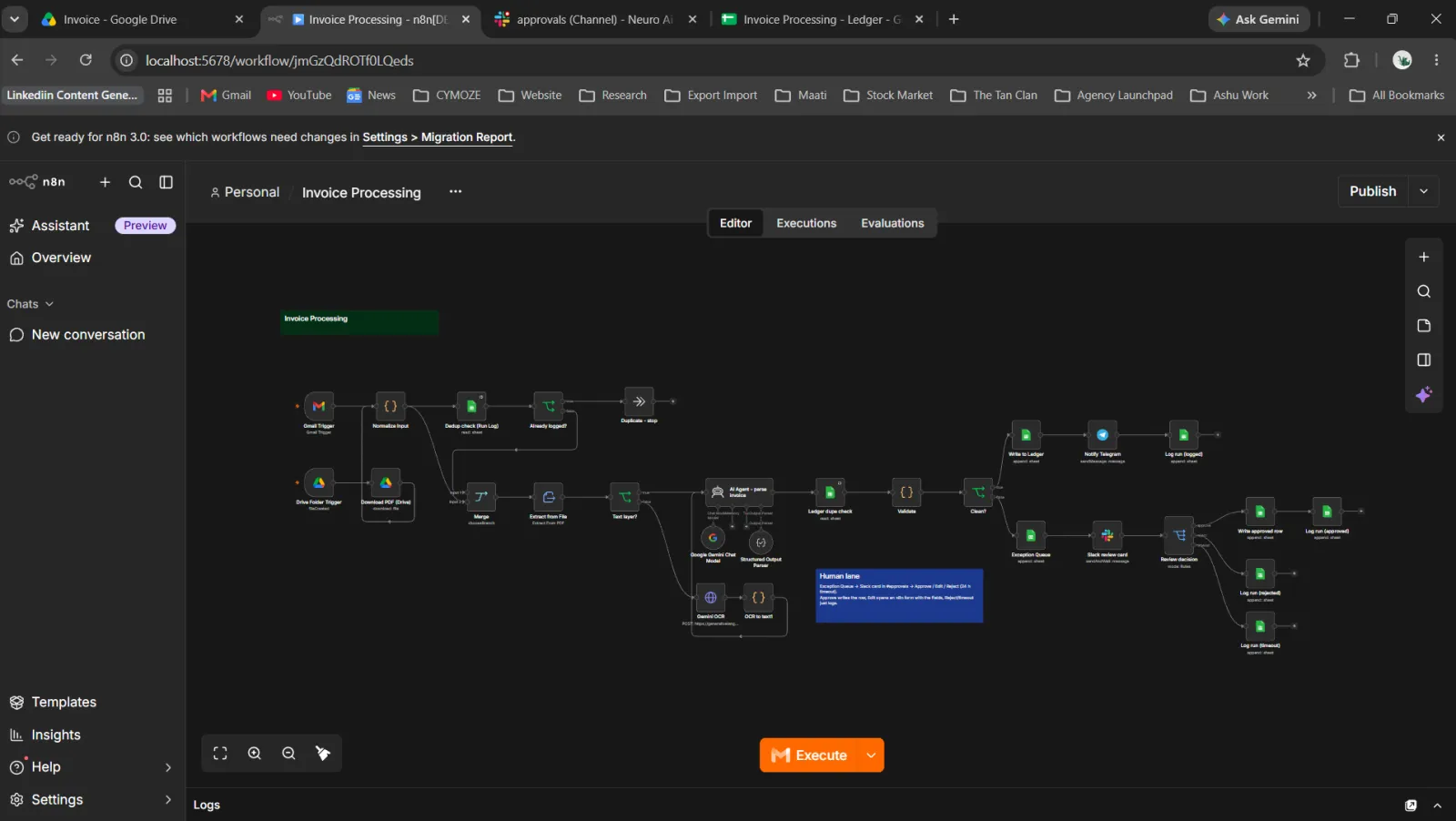
An n8n workflow that takes invoices from two sources, a Gmail inbox and a Google Drive folder, and turns them into structured ledger rows. Text-based PDFs are read directly. Scanned PDFs go through Gemini OCR first. An AI agent then extracts the fields into a fixed JSON schema. Deterministic checks decide whether each invoice is logged automatically or sent to a Slack review queue. Duplicate invoices are caught before parsing, and a notification goes out for every invoice written to the ledger.
Key features
- Two intake channels: A Gmail trigger picks up PDF attachments, and a Drive trigger watches the invoices folder. Both feed the same pipeline.
- Scanned and digital PDFs: Text-based PDFs are read directly. Scanned ones go through Gemini OCR. The branch is chosen by checking whether the file has more than 100 characters of text.
- Structured extraction: The AI agent extracts vendor, invoice number, dates, currency, subtotal, tax, total, line items, and a confidence score, enforced by a structured output parser.
- Rules that override the AI: Each invoice must have a vendor, an invoice number, and a total. Line items plus tax must match the total within 2% (or ₹1/$1 minimum). Confidence must be at least 0.85. Anything that fails goes to review.
- Duplicate protection: Each source file is checked against a run log. Each invoice number is checked against the ledger, which also catches the same invoice arriving through both channels.
- Human review: Flagged invoices post to a Slack channel with the reasons and a link to the source file. A reviewer approves or rejects, and the decision is logged.
- Audit trail: Every outcome is written to a Google Sheets run log, the ledger, or the exception queue.
- Notifications: A Telegram message goes out for each invoice written to the ledger.
Tech stack and why
- n8n: Orchestrates the flow, with native nodes for Gmail, Drive, Sheets, Slack, and Telegram. Non-standard steps like the validation rules sit in readable Code nodes.
- Gmail and Google Drive: The two intake points most small finance teams already use for invoices.
- Google Gemini: Handles both OCR for scanned pages and field extraction. One vendor covers both steps, and the Gemini API key is passed through a simple header credential.
- LangChain Agent with Structured Output Parser: Forces the model to return a fixed schema, so the rest of the pipeline never receives free text.
- Google Sheets: The ledger, run log, and exception queue. Easy to inspect and easy for a finance person to use without any tooling.
- Slack: The review channel. Reviewers act on invoices where they already work.
- Telegram: Lightweight notifications for successful logging.
- Ledger designed to be swapped: The Sheets write node is noted as a placeholder for a QuickBooks “Create Bill” node, so the accounting system can change without rebuilding the pipeline.
17 Nov 2026
Keywords


AI Usage
AI is used in two places. Gemini OCR transcribes scanned invoices into text, and the agent extracts fields from that text into a fixed schema. The system prompt tells the model not to invent values, to leave unknown fields empty, and to lower its confidence score for blurry scans, missing totals, or unusual layouts. AI is not used for decisions. Validation, duplicate checks, routing, and logging are all deterministic. Whether an invoice is logged or reviewed depends on the rules and the confidence score, not on the model’s judgement. Humans only see the exceptions. Limitation to state honestly: the AI output is checked by arithmetic and duplicate rules, not by a second model or a human on every invoice. The accuracy of the approved ledger depends on those rules and on the reviewer.